

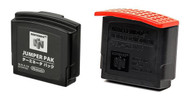
Nintendo 64 Jumper Pak and Expansion Pak Wiki
Posted by DKOldies.com on Apr. 30th, 2014
If you want to Play Donkey Kong on the N64 than you're gonna need a N64 Expansion Pak. The system comes with a Jumper Pak originally, but you can add more memory with the Expansion Pak. This allows for better graphics and performance for more demanding games and it's required if you want to play certain games and I will list all them below.
Jumper Pak
The Jumper Pak plugs into the console’s memory expansion port. Upon release, Jumper Paks were not sold individually and come pre-installed with the system. They can be purchased here at DKOldies. If the system’s expansion port is empty it will not play any games.

Buy The N64 Console Jumper Pak
Expansion Pak
The Expansion Pak is a memory expansion that plugs into the N64 console’s memory expansion port in the place of the Jumper Pak. It is a system upgrade for the Nintendo 64 that doubles the console’s RAM storage capacity to 8 MB. The add-on was released in 1999 and contains 4 MB RDRAM, the same type of memory used inside the console itself. The Expansion Pak is installed in a port on top of the Nintendo 64 and replaces the pre-installed Jumper Pak.
Games that are enhanced but not required to play with expansion pak are:
- Aidyn Chronicles: The First Mage
- Gauntlet Legends
- Hybrid Heaven
- Pokémon Stadium 2
- Resident Evil 2
- Road Rash 64
- Shadow Man
- Star Wars: Episode I Racer
- Turok 2: Seeds of Evil
- San Francisco Rush 2049
- South Park
Games that require the Expansion pak to play are:
- Donkey Kong 64
- Single-player mode of Perfect Dark
- Multiplayer mode of Starcraft 64
- The Legend of Zelda: Majora’s Mask

The N64 Console 4 MB memory Expansion Pak.
Supporting games usually offer higher video resolutions or higher textures and/or higher color depth. For example, the Nintendo 64 all-remade version of Quake 2 features higher color depth but not a higher resolution when using the Expansion Pak. It was used in Starcraft 64 to unlock levels from the popular Brood War add-on for the PC version of the game.
Installing the expansion pak is really simple. Check out the video below to see how: